Ways to Park & Pay
 ParkMobile App
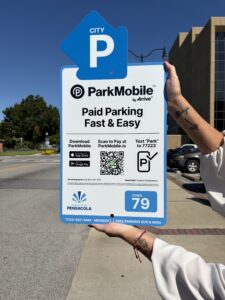
Download the ParkMobile™ app and pay securely with your debit or credit card, and extend your session on the go.
 Pay Machine
Look for PARKPensacola pay stations with the blue signs to park at City-managed lots, on-street parking and the Jefferson Street Garage. You do not need to keep or display a receipt.
 Text to Pay
Text “PARK” to 77223 and you will immediately receive a response to select your parking time and process your payment.
 Buy a Permit
Apply for a monthly parking permit online HERE using your smartphone, smart device or computer.
No change? Quickly pay for on-street and garage parking right from your mobile device! Watch the video to learn how simple parking in Pensacola can be with ParkMobile. *The ParkMobile app is from ParkMobile, a separate company, and the ParkMobile app may also be used in some privately-owned, non-City lots.
How it Works
1. Enter Your (2-Digit) Zone Number
2. Set Your Time
3. Select Your Vehicle
4. Pay and Go
Perks of Using ParkMobile
Easily register and start your first session.
• Save “Favorite” and recently used parking zones.
• Extend your parking session on the go.
• Use the “Find My Car” feature to receive turn by turn directions.
• Customize your parking expiration reminders.
• Add up to five vehicles to your account.
• Pay from your car, or anywhere!

PARKMobile App Support
- Chat directly with ParkMobile Customer Assistance using the app. Just click on Settings ——> Chat Support.
- Or you can call ParkMobile at 1-877-727-5457.
Use the App to Find Nearby Parking
 The ParkMobile™ app will show you via GPS all of the options nearest to you including hours and rates so you can pick the one you want.
Be sure to look for 2-digit zones for official City parking.
App FAQs
How can parking enforcement verify that I have paid through the app for my parking?
Easily register and start your first session.
• Save “Favorite” and recently used parking zones.
• Extend your parking session on the go.
• Use the “Find My Car” feature to receive turn by turn directions.
• Customize your parking expiration reminders.
• Add up to five vehicles to your account.
• Pay from your car, or anywhere!
City of Pensacola Parking Ambassadors use license plate recognition technology to verify parking payment transactions. There is no need to print a receipt to verify your payment; however, you can see(and export) a summary of your paid transactions at any time by going to your Account/History page.
Can I use the ParkMobile app to pay for parking anywhere in Pensacola?
Yes, you can use the app in all City managed parking lots, on-street and garage parking, as well as for privately owned parking spots whose owners have elected to be part of the ParkMobile app system. All available nearby parking will show up on the parking map when you log in. Please note that PARKMobile is not for exclusive use for the City but is also used for some private lots
Is payment secure?
Yes, your payments made through the ParkMobile app are highly secure. The payment system is certified to the highest Payment Card Industry standards.
How much does it cost?
The ParkMobile app is free to download. When you select and purchase a parking transaction using the app you’ll pay the standard parking fee for that parking location, plus an additional convenience fee for using the app. You will be notified of the total charge prior to confirming your payment.
Can I register more than one vehicle in my account?
Yes! When you register, add the license plate of your primary vehicle. Later, you can add/register up to five total vehicles by visiting the My Account page, or add them when you perform your next parking session. *Be sure you select the correct plate when parking if you have multiple plates registered.
I entered the wrong zone number. Can I change it?
Unfortunately your parking transaction may not be cancelled or changed at this stage. However, your parking payment remains valid for any City of Pensacola PARKMobile parking space of the same type for the duration of your paid session. (For example, if you paid for an on-street session, you may park in any on-street City spot but not a garage or boat ramp lot spot.)
*Purchases made through PARKMobile are nontransferable between City and private parking spots.
I can’t get the app to work. What is the problem?
Try restarting your device; then open the app to see if it works as expected. If you are using cellular data or Wi-Fi and have issues with the app, try to connect to another Wi-Fi network. To check your Wi-Fi connection, try streaming a video from the internet to see if it loads quickly. Or contact your internet provider for more help.
Parking Made Easier
For more information or assistance, please call (850) 436-5648.
Pay Machine
How it Works
1. Press any button or press START
2. Enter your tag number
3. Set time (BEFORE you enter your credit card)
4. Insert coins, bills or credit card
4. Want to print a receipt? Press “1” for Yes or “2” for No
• You don’t have to print and display a receipt—your payment is tracked electronically. (But you can print one if you need it!)
• Using a pay machine means you don’t have to download an app or use your phone to pay.
Pay Machine Tips
• Don’t start by putting your credit card in the machine.
• Hit any button to get started.
• Pay machines do not give change.
Text to Pay
How it Works
1. Text “PARK” to 77223
2. Enter your vehicle info
3. Choose length of stay
4. Enter payment info
Perks of Text to Pay
• Easily pay for parking on-the-fly.
• No need to download an app.
• Customize your parking expiration reminders.
• Extend your parking session on the go.
• No need to search for a pay machine.
• The “Find My Car” feature gives you directions back to your car.
• Pay from inside your car, or anywhere!
• GPS map displays available parking nearby.
FREE Parking
• 60% of all City parking is FREE.
• City parking is FREE on Sundays.
• City parking is FREE on Mondays.
• City parking is FREE on federal holidays.
• City parking is FREE to anyone with a valid, visible disabled parking tag or placard.
*Excluding boat ramps.